Wallpapers:Live&Control Center
- 4.7
- Rating
- 1.00M
- Installs
- Free
- Price

 Analysis by App-foxy
I installed Wallpapers:Live&Control Center because I wanted a quicker way to change the look of my phone without collecting separate wallpaper, widget, and control-center apps. It sits in the personalization category and takes a broader approach than a simple background picker: the experience brings together live wallpapers, static images, and Control Center templates in one place. That combination is its main appeal, especially if you enjoy changing your phone’s appearance as often as you change your lock-screen photo.
My first impression was that this is best understood as a visual customization toolbox rather than a complete replacement for the phone’s own settings. The app is free to install, although some items are offered through in-app purchases ranging from $0.99 to $29.99 per item. That matters because the free starting point is useful for exploring the style, while the most attractive collections may lead you toward optional purchases. I would recommend trying the free material first instead of assuming every preview is included.
From an ordinary home screen to a more personal setup
The starting condition for my test was familiar: a phone that worked perfectly but looked unremarkable. I had a background I had stopped noticing, and opening the system settings every time I wanted a change felt unnecessarily slow. This is where the app makes sense. Rather than searching through random image folders, I could browse a collection designed specifically for phone screens and decide whether I wanted movement, a still image, or a more themed interface.
You May Also Like

 Blood Strike: 2.5 Anniversary
Blood Strike’s Loadouts Turn Every Drop Into a Tactical Gamble
A close look at Blood Strike’s custom loadouts: how fast access to signature weapons reshapes its battle royale rhythm, rewards preparation, and narrows the gap between fights.

 Pandora - Music & Podcasts
Pandora’s Music Is Easy to Start, but Harder to Recover
Pandora’s strength is its low-effort path from a seed to a station. Its weak spot is how much confidence it asks you to place in connection, setup, and quiet recovery.

 8 Ball Pool
 Is Built on Rivalries, Rematches, and Routine
A close look at the rivalries, rematches, shared routines, and unanswered safety questions that turn a quick pool match into a persistent mobile community.

 Samsung Music
’s Quiet Strength Is Playing What You Already Own
Its reach comes less from spectacle than from dependable access to a personal library. That simplicity is both the app’s strongest retention engine and its ceiling.

 AccuWeather: Weather Radar
AccuWeather Review: A Quick, Clear Forecast for Everyday Decisions
For everyday plans, the best forecast is the one you can understand quickly. AccuWeather makes rain timing, radar, and local conditions easy to act on, with a few trade-offs.

 Hill Climb Racing
Why Hill Climb Racing Still Turns Crashes Into One More Run
A tiny car, a bumpy hill and one more upgrade: Hill Climb Racing keeps resurfacing because its simple chaos makes every near-miss feel personal.
More From Our News Desk



The distinction between live and static wallpapers is important in everyday use. A static option is the safer choice when I want a clean background behind icons and readable text. A live wallpaper is more expressive, but motion can compete with app labels or make a busy lock screen feel less calm. I found myself choosing animated designs for short-term changes and returning to simpler images when I wanted the phone to remain easy to read.
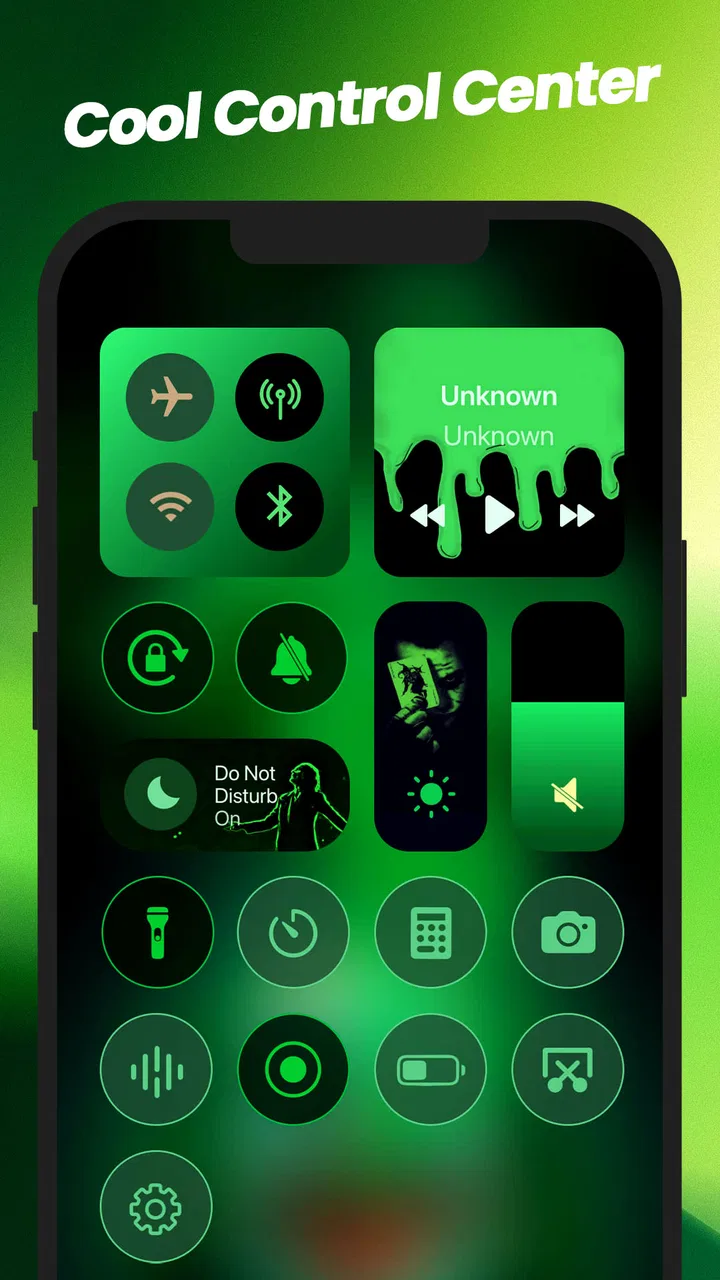
The app’s store presence describes it simply as “Wallpapers,” but that undersells the Control Center side of the experience. The templates are aimed at people who want the quick-access area to feel coordinated with the rest of the phone. I would not treat them as a replacement for the operating system’s actual controls. Instead, they work as a visual layer for users who care about matching colors, shapes, and overall presentation.
That difference also explains who should skip it. If you only change your wallpaper once a year, the phone’s built-in picker may be enough. If your priority is deep system-level modification, automation, or a highly technical launcher setup, this app is probably not the right tool. Its strength is convenience and visual variety, not turning the operating system into something entirely different.
Choosing the right starting material
I recommend beginning with a static wallpaper even if live backgrounds are the reason you installed the app. It gives you a reference point for icon visibility, text contrast, and how much of the image remains visible after the phone crops it. Once that works, moving to a live option becomes a deliberate choice rather than a reaction to an attractive preview.
A useful trick is to judge a wallpaper with your actual home screen in mind, not just the full-screen preview. A design can look impressive by itself but become distracting once notification badges, folders, and widgets are placed over it. Darker or less detailed areas behind the icons usually produce a more comfortable result. This is one of the app’s hidden trade-offs: the most dramatic artwork is not always the most usable background.
I also treated the Control Center templates as a separate design decision. A matching template can make the phone feel more intentional, but it does not automatically improve the organization of the controls themselves. The benefit is visual consistency. The practical controls still depend on the phone’s own system interface, so users expecting a full functional redesign should adjust their expectations before spending money.
My step-by-step workflow
My workflow was straightforward. I opened the app, browsed the available visual styles, and first selected a static background that left enough quiet space for the home-screen icons. After checking how it looked in normal use, I compared it with a live alternative. This comparison helped me decide whether the movement added personality or simply made the screen feel busier.
After that, I looked at the Control Center templates and considered them as a companion rather than an essential second purchase. The most sensible order is to settle the wallpaper first, then choose a template that complements it. Doing this in reverse can lead to a mismatched setup where each element looks attractive alone but the phone feels visually confused as a whole.
The final step was a practical check away from the app’s browsing screen. I opened several everyday apps, returned to the home screen, checked notifications, and looked at the phone in different lighting. That last check is easy to overlook. A bright animated design may look excellent in a store-style preview but become tiring when viewed repeatedly during a normal day.
The best result comes from treating the app as a design workflow, not a collection of isolated downloads. Choose one visual anchor, test it with real icons and notifications, and only then add a matching Control Center style. This approach reduces the temptation to install or buy several items before knowing whether they work together.
Where the handoffs create friction
The first handoff is between browsing and the phone’s own wallpaper system. The app helps me discover and prepare a visual choice, but the final appearance still depends on how the operating system applies and crops it. That means the image I select is not always the image I perceive after it becomes the actual lock screen or home screen. A design with important details near the edges is especially vulnerable to an awkward crop.
The second handoff is between visual customization and daily usability. A wallpaper can be attractive while making text harder to read, and a lively background can draw attention away from notifications. I would therefore avoid judging the app only by its gallery. The real test is whether the result remains comfortable after several hours of normal phone use.
The Control Center handoff deserves similar caution. The templates can support a coordinated look, but they should not be confused with a promise that every system control behaves differently. For me, that made the feature more useful as a finishing touch than as the central reason to install the app. Users who mainly want functional shortcuts may get more value from the operating system’s own customization options.
There is also a financial handoff when free browsing turns into a purchase decision. Because the app is free but includes paid items, I would check the exact item before confirming anything and ask whether it solves a real problem for my setup. Paying for a wallpaper that I will replace tomorrow is difficult to justify; paying for a style that fits a long-term theme makes more sense. The wide price range means the value of each item depends heavily on how often you customize.
What the finished setup feels like
In the best-case scenario, the result is a phone that feels refreshed without requiring a complicated launcher or a long settings session. The static wallpaper gives the home screen a cleaner identity, while a coordinated Control Center template adds a second visual touch when I open quick settings. Live wallpapers are better when I want the phone to feel more playful or seasonal, although I personally prefer using them selectively rather than leaving every animated option enabled all the time.
A realistic example would be preparing a phone for a new semester, a trip, or a change in routine. I could choose a calm static background for workdays, switch to a brighter live design on weekends, and use a matching Control Center style when I want the whole interface to feel themed. The handoff from browsing to applying is quick enough for this kind of occasional refresh, and the app provides more direction than searching through a general image gallery.
It is also useful for people who share a device with family members or who want different visual moods without rebuilding the entire phone. A parent may prefer an uncluttered static image with strong contrast, while a younger user may enjoy a more animated design. The app gives both users a starting point, but the final choice still needs to respect readability and personal comfort.
The developer is ThemeKit, and the app has built a sizeable audience: it has more than a million installs, with an average rating of 4.1 from about 33 thousand ratings. I see those figures as evidence that the general idea connects with many users, not as proof that every design will suit every phone. The experience is subjective by nature. A person who loves animated backgrounds may rate it highly, while someone who wants only a minimal system interface may find it unnecessary.
Compatibility, age guidance, and version context
The app runs on Android devices using version 6.0 or later, which gives it broad compatibility with older phones as well as newer models. Still, compatibility does not guarantee an identical visual result across devices. Screen proportions, system behavior, and the way a phone handles wallpaper placement can affect the final appearance, so I would test one free option before building an entire theme around it.
It carries a Teen content rating, something parents should keep in mind when deciding whether it is suitable for a younger user. That rating does not change the basic personalization purpose, but it is a useful reminder to review the available designs and any purchase decisions on a shared device.
The current version is 4.0, and the app was released on January 11, 2024. I would keep it updated through the normal app store process, particularly if a selected design does not behave as expected. More importantly, I would avoid assuming that a wallpaper’s preview guarantees the same result after an operating-system update or on a different screen shape.
When another option is the better choice
The built-in wallpaper picker is better for users who want the simplest possible process and do not care about browsing a specialized collection. It usually has fewer decisions, fewer purchase prompts, and a more direct connection to the phone’s own display settings. If your goal is merely to place a personal photo behind the icons, installing this app may add an unnecessary step.
A dedicated launcher or advanced customization suite is a better fit for someone who wants to redesign icon packs, gestures, layouts, and behavior together. Wallpapers:Live&Control Center does not need to compete on that ground. Its appeal is narrower and clearer: it helps create a themed visual surface without asking me to rebuild the whole interface.
It is also not ideal for people who dislike animated visuals or who prefer complete control over every image detail. The app is strongest when I want curated inspiration and a fast change. It is weaker when I already have a precise design in mind and need professional editing tools, exact cropping controls, or a fully custom system theme.
My buying advice after using it
I would start with the free experience and make one complete setup before considering paid content. That means selecting a background, applying it, checking icon readability, opening the quick-access area, and living with the result for a while. This prevents the common mistake of buying several attractive items that do not work together on the actual home screen.
I would also choose based on frequency of use. Someone who changes themes every week may find more value in a larger selection, while someone who wants one polished look should be selective. Since individual in-app items can cost from $0.99 to $29.99, the higher end deserves a clear reason. A wallpaper alone should not be treated as a major upgrade unless it genuinely delivers the style you intend to keep.
For a first setup, I suggest a quiet static background, a restrained Control Center template, and a live wallpaper saved for occasional changes. This combination shows what the app can do without allowing motion or decoration to overwhelm the phone. It also makes it easier to identify whether the app’s visual approach matches your taste before you invest more time or money.
My final view
Wallpapers:Live&Control Center is a useful personalization app for someone who wants more than a random image but less than a complete launcher overhaul. I like the way it connects live wallpapers, static designs, and Control Center styling into one visual journey. The strongest experience comes from browsing with a plan, testing the result on the real home screen, and treating each purchase as an optional finishing step rather than a requirement.
Its limitations are clear: visual previews do not remove cropping and readability concerns, Control Center templates should not be mistaken for full system replacements, and the paid catalog requires restraint. Those points do not ruin the app, but they do shape the right expectations. I would recommend it to people who enjoy refreshing their phone’s appearance and want curated ideas in one place. I would skip it if the built-in picker already meets my needs or if I am looking for deep functional customization.
Overall, I found it most convincing as a quick way to move from an ordinary screen to a coordinated personal setup. The outcome depends less on choosing the flashiest design than on managing the handoffs between the app, the operating system, and everyday use. When those steps are handled carefully, Wallpapers:Live&Control Center makes a phone feel noticeably more personal without turning customization into a major project.
FAQs for Wallpapers:Live&Control Center
01What features does Wallpapers: Live & Control Center offer?
Wallpapers: Live & Control Center provides a wide range of features including high-quality live wallpapers, customizable control center widgets, and seamless integration with your device’s home and lock screens. Users can personalize their experience with dynamic themes and interactive elements, making their screen both functional and visually appealing.
02Is Wallpapers: Live & Control Center compatible with all devices?
The app is designed to work on both Android and iOS platforms, but compatibility may vary depending on your device's operating system version and hardware capabilities. It's recommended to check the app’s compatibility details on the download page to ensure optimal performance on your specific device.
03How does Wallpapers: Live & Control Center impact battery life?
Live wallpapers and control center widgets can have a moderate impact on battery life, especially if they're resource-intensive. However, the app is optimized to minimize power usage. Users can adjust settings to balance performance and battery consumption, ensuring that the app runs efficiently without significantly draining battery life.
04Is there a cost associated with using Wallpapers: Live & Control Center?
While the app offers a free version with basic features, there are in-app purchases available for premium content. This includes exclusive wallpapers, advanced customization options, and ad-free usage. Users can choose the free version or upgrade to access the full range of features based on their preferences.
05Can users create their own wallpapers within the app?
Yes, Wallpapers: Live & Control Center allows users to create custom wallpapers using its built-in tools. Users can select images from their gallery, apply effects, and use the app's templates to design unique wallpapers. This feature enhances personalization, giving users more control over their device's aesthetic.
Pros
- Vast collection of high-quality wallpapers.
- User-friendly interface with easy navigation.
- Regular updates with new content.
- Low battery consumption with live wallpapers.
- Customizable control center features.
Cons
- Contains ads that might disrupt experience.
- Limited features available in the free version.
- Requires internet for some functionalities.
- Some wallpapers may not fit all screen sizes.
- Occasional lag on older devices.

Wallpapers:Live&Control Center
Gallery